My developer setup
The laptop, OS, terminal, and editor I use every day, kept simple on purpose.
Aug 5, 2026 | 3 min read
I do most of my work in a terminal and an editor. Nothing fancy, just tools that stay out of the way.
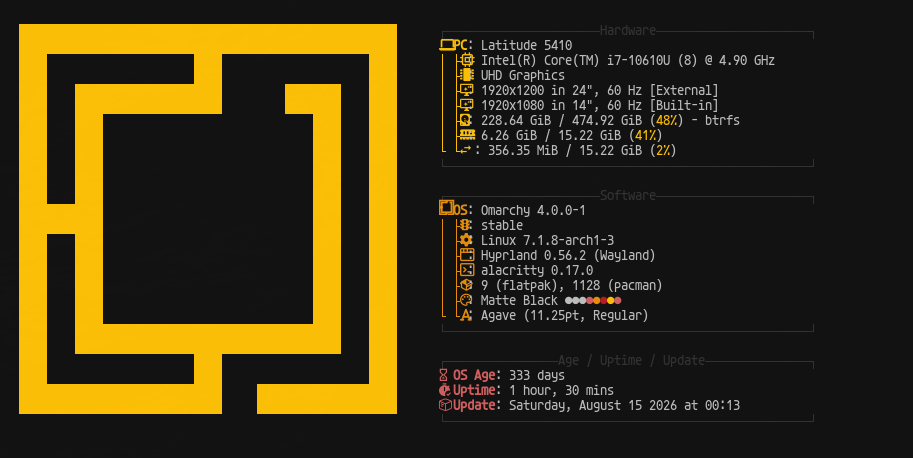
Laptop
Dell Latitude 5410 with an Intel Core i7-10610U (8 cores, up to 4.9 GHz) and 16 GB of RAM.
I plug into a 24" monitor at my desk and use the 14" built-in screen when I am on the move. 16 GB is enough for a dev server, a browser, and Cursor open at the same time.
Operating system
Omarchy on Linux. It is Arch-based and ships with Hyprland as the window manager.
I wanted a clean Linux desktop that I could tune without rebuilding everything from scratch. Omarchy gave me that.
Terminal
Alacritty is my terminal. Inside it I run bash with two small add-ons:
- Starship, a fast prompt that shows the folder, git branch, and Node version.
- ble.sh, better line editing and tab completion.
For longer sessions I use tmux to split panes and keep things running. herdr helps me manage terminal workspaces when I am working with AI agents.
Theme is Matte Black. Font is Agave at 11.25pt.
Editor
Cursor, VS Code underneath, so my extensions and keybindings still work.
I keep editor settings light. Most of the real setup lives in the repo: TypeScript, ESLint or Biome, and Prettier.
Day-to-day tools
I mostly work in JavaScript, so runtimes and package managers matter more than anything else.
| Tool | What it does |
|---|---|
| tmux | Split panes and keep sessions alive |
| herdr | Manage terminal workspaces for AI coding agents |
| fnm | Switch Node versions per project |
| Bun | Fast runtime and package manager when a project fits it |
| pnpm | Install packages in JavaScript projects |
| SDKMAN | Switch Java versions when I need the JVM |
| ESLint / Biome | Lint code. Biome when I want lint and format in one tool |
| Prettier | Format code when the repo already uses it |
| Git + GitHub CLI | Version control and pull requests |
What I care about
I want to clone a repo, install deps, and run the same commands as CI, fast, every time.
I do not chase new tools for the sake of it. If something saves me clicks every day, it stays. If not, it goes.
This post is a snapshot. The stack will change. The goal will not: less friction, more building.